Learn cloud computing from scratch with this beginner-friendly guide. Understand how cloud computing works, its types, service models, benefits, real-world applications, and career opportunities in 2026.
Cloud computing has become one of the most important technologies in today’s digital world. Whether you’re using Gmail, watching Netflix, saving photos to Google Drive, or collaborating on Microsoft 365, you’re already using cloud computing.
Instead of storing data or running applications on your personal computer, cloud computing allows you to access computing resources over the internet. This technology has transformed how individuals, businesses, and governments store information, build applications, and manage IT infrastructure.
In this beginner-friendly guide, you’ll learn what cloud computing is, how it works, its different types, advantages, disadvantages, and why it is considered one of the most valuable skills to learn in 2026.
What is Cloud Computing?
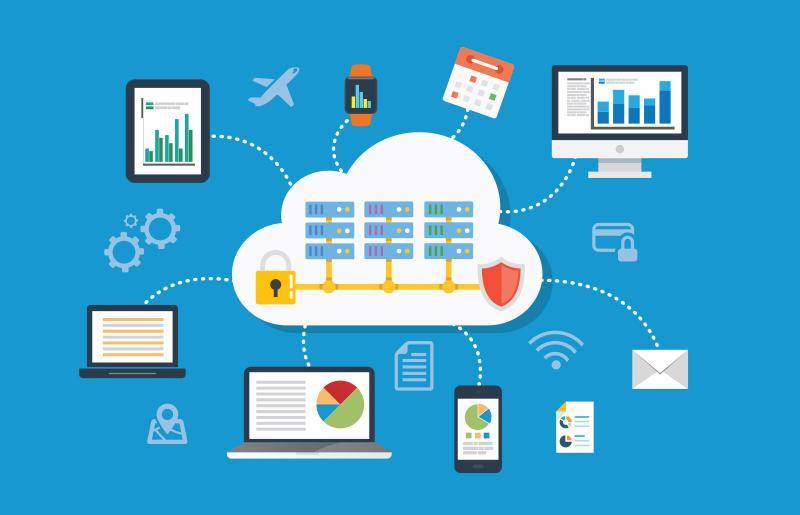
Cloud computing is the delivery of computing services—including servers, storage, databases, networking, software, analytics, and artificial intelligence—over the internet (“the cloud”).
Rather than buying and maintaining expensive hardware, users rent computing resources from cloud providers and pay only for what they use.
Simple Example
Imagine electricity.
You don’t own a power plant to run your home. Instead, electricity is supplied whenever you need it, and you pay based on your usage.
Cloud computing works the same way.
Instead of purchasing expensive servers, companies rent computing power from cloud providers whenever they need it.
Everyday Examples of Cloud Computing
Most people use cloud services every day without realizing it.
Some common examples include:
- 📧 Email services
- 📸 Cloud photo backups
- 🎬 Video streaming
- 🎵 Music streaming
- 📁 Online document storage
- 🎮 Cloud gaming
- 📹 Video conferencing
- 🤖 AI assistants like ChatGPT
How Does Cloud Computing Work?


The process is surprisingly simple:
Step 1: User Sends Request
You open an application or website.
Example:
- Gmail
- Google Drive
- Netflix
↓
Step 2: Internet Transfers Data
Your request travels through the internet.
↓
Step 3: Cloud Data Center
Large data centers receive your request.
Thousands of powerful servers process it.
↓
Step 4: Response Returned
The processed information is sent back to your device in seconds.
Major Components of Cloud Computing
1. Servers
Powerful computers that process requests.
2. Storage
Places where files and databases are stored.
3. Networking
Connects millions of devices around the world.
4. Virtualization
Allows one physical server to act like many virtual computers.
5. Security
Protects data using encryption, authentication, and backups.
Types of Cloud Deployment
1. Public Cloud
Resources are shared among many customers.
Examples include services from major cloud providers.
Advantages
- Affordable
- Easy to scale
- No hardware maintenance
Best for:
- Small businesses
- Students
- Startups
2. Private Cloud
Infrastructure is dedicated to one organization.
Advantages
- Higher security
- Better control
- More customization
Best for:
- Banks
- Government agencies
- Healthcare organizations
3. Hybrid Cloud
Combines public and private cloud environments.
Organizations keep sensitive information in private systems while using public cloud resources for less-sensitive workloads.
Advantages
- Flexible
- Cost-effective
- Secure
Best for:
Large enterprises.
Cloud Service Models


1. IaaS (Infrastructure as a Service)
You rent:
- Virtual machines
- Storage
- Networking
You manage:
- Operating system
- Applications
- Data
Ideal for developers and IT teams.
2. PaaS (Platform as a Service)
The provider manages the infrastructure.
You simply develop and deploy applications.
Ideal for software developers.
3. SaaS (Software as a Service)
You use software through a web browser.
Examples include:
- Online office suites
- Video conferencing tools
No installation required.
Advantages of Cloud Computing
💰 Cost Savings
No need to purchase expensive servers.
⚡ Scalability
Increase or decrease resources instantly.
🌍 Access Anywhere
Use applications from any location.
🔒 Automatic Backups
Data is regularly backed up.
🔄 Automatic Updates
Software updates happen automatically.
🤝 Better Collaboration
Teams can work together in real time.
🚀 Faster Innovation
Developers can launch applications much more quickly.
Disadvantages
Like any technology, cloud computing has some limitations.
Internet Dependency
Without internet access, many cloud services cannot be used.
Privacy Concerns
Sensitive information is stored on remote servers.
Downtime
Cloud providers can occasionally experience outages.
Vendor Lock-In
Moving from one cloud provider to another may be difficult.
Security Risks
Poor password practices and misconfigured systems can expose data.
Popular Cloud Providers
Some of the world’s leading cloud platforms include:
- Amazon Web Services
- Microsoft Azure
- Google Cloud
- IBM
- Oracle
Cloud Computing Use Cases
Many industries rely on cloud technology every day.
Education
- Online classrooms
- Digital assignments
- Virtual labs
Healthcare
- Electronic health records
- Telemedicine
- Medical imaging storage
Banking
- Mobile banking
- Fraud detection
- Secure transactions
Entertainment
- Video streaming
- Music streaming
- Online gaming
Business
- Customer relationship management
- Data analytics
- Collaboration tools
Cloud Computing and AI
Artificial intelligence depends heavily on cloud computing.
Cloud platforms provide:
- Powerful GPUs
- Large-scale storage
- AI model training
- Machine learning tools
- Data analytics services
Without cloud infrastructure, training modern AI models would be much more expensive and time-consuming.
Essential Cloud Skills for Beginners
If you’re starting a career in cloud computing, focus on learning:
- Basic computer networking
- Linux fundamentals
- Operating systems
- Virtual machines
- Cloud storage concepts
- Databases
- Security fundamentals
- Containers (such as Docker)
- Container orchestration (such as Kubernetes)
- Basic scripting (Python or Bash)
- Infrastructure as Code concepts
- Monitoring and logging
Career Opportunities
Cloud computing professionals are in high demand.
Common job roles include:
- Cloud Engineer
- Cloud Administrator
- Cloud Developer
- DevOps Engineer
- Solutions Architect
- Cloud Security Engineer
- Site Reliability Engineer (SRE)
Future of Cloud Computing
The future of cloud computing is closely connected with emerging technologies such as:
- Artificial Intelligence (AI)
- Machine Learning (ML)
- Edge Computing
- Internet of Things (IoT)
- Serverless Computing
- Quantum Computing
- 5G Networks
- Green and Sustainable Cloud Infrastructure
As more businesses undergo digital transformation, demand for cloud expertise is expected to continue growing.
Tips for Beginners
- Start with cloud computing fundamentals.
- Learn basic networking and Linux concepts.
- Explore free learning resources and hands-on labs.
- Practice deploying simple applications.
- Understand security best practices.
- Build small projects to strengthen your skills.
- Consider earning an entry-level cloud certification once you’re comfortable with the basics.
Conclusion
Cloud computing has changed the way we store data, build applications, and access digital services. From streaming entertainment to powering advanced AI systems, it has become the backbone of the modern internet.
For beginners, understanding cloud computing opens the door to exciting career opportunities in software development, cybersecurity, data science, and IT infrastructure. By learning the fundamentals and gaining practical experience, you can build a strong foundation for one of the fastest-growing fields in technology.